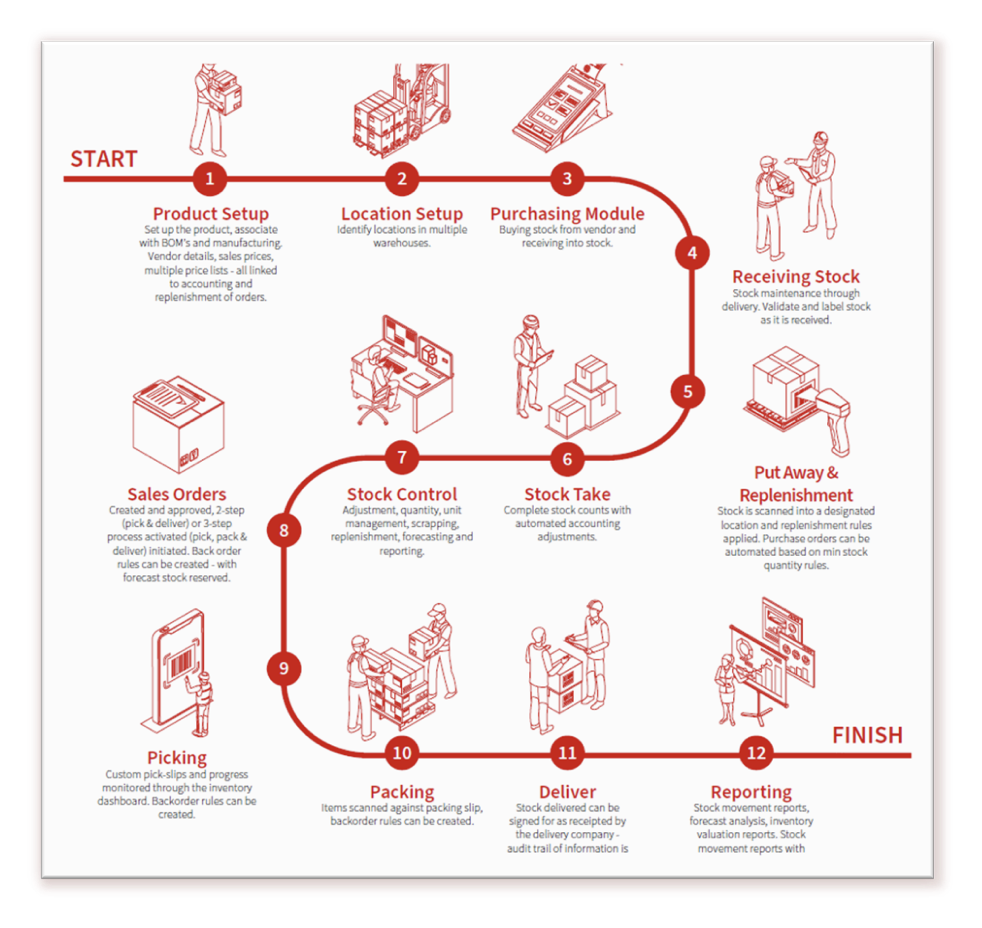
Efficient warehouse management is crucial for any business dealing with inventory, distribution, or manufacturing. Odoo’s Warehouse Management System (WMS) offers a fully integrated and flexible solution to manage every aspect of your supply chain — from goods receipt to delivery — in real-time. In this blog, we explore the key modules and processes that make Odoo WMS a smart choice for growing businesses.
What Is Odoo Warehouse Management?
Odoo Warehouse Management is part of the broader Odoo ERP suite. It provides a comprehensive, real-time view of stock levels, locations, movements, and operations, helping businesses reduce errors, improve inventory accuracy, and enhance customer satisfaction.
Key Modules in Odoo Warehouse Management
Odoo’s modular structure allows businesses to customize their warehouse setup. The following modules form the backbone of the Odoo WMS:

Inventory Module
- Central Hub for Warehouse Operations
- Tracks product quantities, stock locations, and inventory valuations.
- Supports batch, serial numbers, and multiple units of measure.
- Includes automated reordering rules and lead time tracking.

Purchase Module
- Connects procurement with warehouse receipts.
- Automatically generates purchase orders based on stock rules.
- Integrates with vendor lead times and delivery schedules.

Sales Module
- Handles outbound deliveries tied to customer orders.
- Triggers picking and packing workflows upon sales confirmation.
- Updates inventory levels in real time.

Manufacturing Module
- Coordinates raw material consumption and finished goods reception.
- Supports make-to-order and make-to-stock strategies.
- Integrates with Bills of Materials (BoMs) and work centers.
Barcode Module
- Enables fast, paperless operations using barcode scanning.
- Supports all warehouse transactions: receipts, internal moves, pickings, inventory adjustments, and deliveries.
- Reduces errors and boosts efficiency.
Warehouse Processes Made Easy with Odoo
Let’s explore the essential warehouse workflows that Odoo automates and enhances:
Goods Receipt and Putaway
- Receive incoming shipments with barcode verification.
- Use putaway rules to assign optimal storage locations based on product category, size, or turnover rate.
- Maintain a clean audit trail from purchase to storage.
Warehouse Picking and Packing
- Support for multiple picking strategies: FIFO, batch picking, wave picking, and zone picking.
- Orders are grouped and prioritized automatically for faster fulfillment.
- Packing operations are optimized for packaging types, weights, and delivery locations.
Stock Transfers and Internal Movements
- Move stock between zones, warehouses, or work centers with full traceability.
- Barcode scanning ensures accurate product identification during internal moves.
Delivery and Shipment Tracking
- Integrate with logistics carriers (DHL, UPS, FedEx) for real-time rates and shipping label generation.
- Customers receive automated tracking updates.
- Proof of delivery and delivery slips are generated instantly.
Inventory Adjustments and Cycle Counts
- Schedule and perform periodic cycle counts.
- Automatically reconcile discrepancies between system and physical stock.
- Maintain full control over inventory accuracy.
Benefits of Odoo Warehouse Management System
By adopting Odoo’s WMS, businesses unlock:
- ✅ Accurate inventory management
- ✅ Faster warehouse picking and packing
- ✅ Real-time stock visibility
- ✅ Reduced manual errors
- ✅ Integrated logistics and fulfillment
- ✅ Improved customer satisfaction through faster delivery
Whether you're running a single warehouse or managing a global supply chain, Odoo adapts to your operations — from barcode-driven picking to automated reordering and delivery scheduling.
Who Is Odoo WMS For?
Odoo WMS is ideal for:
- Distribution centers
- Retailers and wholesalers
- Manufacturers
- eCommerce businesses
- 3PL and logistics companies
If you’re looking for a flexible and affordable stock control software that grows with your business, Odoo is a strong contender.
Odoo Warehouse Management System combines powerful features, automation, and scalability to give you full control over your inventory and warehouse operations. From receiving goods to packing and shipping, every step is optimized for efficiency and accuracy.
Frequently Asked Questions about Odoo Warehouse Management
1. Can Odoo handle multiple warehouses and locations?
Yes! You can track stock in real-time across multiple warehouses and even create rules for automated internal transfers.
2. Does Odoo support barcode scanning?
Yes. Odoo has a built-in barcode app that supports receiving, delivery, and inventory adjustments using scanners or mobile devices.
3. Is it suitable for small businesses?
Absolutely. Odoo WMS is modular and scalable. You can start with basic tools and expand over time as your business grows.
4. How does Odoo reduce warehouse errors?
Through automation, smart picking strategies, barcode scanning, and validation checkpoints—Odoo minimizes manual errors and improves accuracy.
5. Can it integrate with my ecommerce or POS?
Yes. Odoo connects easily with ecommerce platforms and point-of-sale systems for accurate, synced inventory.
6. How long does implementation take?
It varies by business, but at XRA, we typically get you live within weeks—not months. We handle setup, training, and ongoing support.
Looking to modernize your warehouse operations?
Talk to our team about implementing Odoo WMS and experience seamless logistics and inventory control.
See how we transformed operations for a leading packaging manufacturer here